
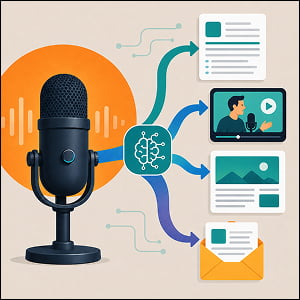
AI-assisted podcast production is the practice of using artificial intelligence tools to handle the repetitive, time-consuming parts of making and marketing a podcast (e.g. transcribing the audio, writing show notes and episode descriptions, cutting long episodes into short social clips, and reshaping a single recording into blog posts, newsletters, and social copy). Instead of treating each episode as a one-and-done audio file, this approach treats every recording as a source asset that can be sliced, summarized, and republished across channels with a fraction of the manual effort it used to take.
In this article we’ll discuss why podcast repurposing has become such a high-leverage marketing activity, which categories of AI tools actually move the needle, and how to build a workflow that saves you hours without making your content sound like it was assembled by a machine. We’ll look at the production layer (transcripts and editing), the distribution layer (clips and show notes), and the strategy layer (keeping quality and brand voice intact), so you can decide where AI belongs in your own process.
TL;DR Snapshot
Podcasts generate more reusable content than almost any other media format, but most of that value goes to waste because turning a 60-minute episode into clips, notes, and posts is slow manual work. AI now automates the bulk of that process, transcribing audio in minutes, drafting SEO-friendly show notes, and surfacing the most shareable moments for short-form video. The result is more reach per episode and far less production time, as long as a human stays in the loop to protect accuracy and brand voice.
Key takeaways include…
- A single podcast episode can fuel a week of cross-channel content (transcripts, blog posts, clips, and social copy) when you treat the recording as a source asset rather than a finished product.
- AI tools handle the slowest parts of repurposing, with manual clip-finding alone taking three to five hours per episode before automation.
- The “right way” to use these tools is to automate the grunt work but keep human review on accuracy, tone, and final edits so that quality never slips.
Who should read this: Marketers, podcasters, content strategists, solopreneurs, and creators who want more reach from every episode they record.
Why Repurposing Is Where the Real Value Lives
Podcasting is no longer a niche hobby, which is exactly why squeezing more out of each episode matters. According to Riverside, more than 584 million people listened to podcasts in 2025, with that number expected to reach 619 million in 2026. The audience is also moving toward video, with more than half of shows now posting full video episodes on YouTube. And the payoff for making a great podcast is real: a CoHost year-in-review report found that 61% of podcast listeners said an episode made them more favorable toward a brand.
When it comes to repurposing podcasts, the problem has always been the cost of doing it by hand. As Quso.ai notes, finding shareable moments and reformatting them for social media used to mean scrubbing through the full recording and manually identifying/editing shareable clips, which can take three to five hours per episode. That’s the gap artificial intelligence closes. An OpusClip analysis reported that AI-powered tools can save creators up to 200 hours annually.
The Production Layer: Transcripts and Editing
Everything downstream starts with a clean transcript, so this is where most AI podcast workflows begin. Speech-to-text tools convert an hour of audio into searchable text in minutes, and the better ones add speaker labels and timestamps automatically. Otter.ai, for example, offers real-time transcription with speaker identification and can generate episode highlights, which makes it a favorite for interview shows. For teams that prize raw accuracy, dedicated transcription services like Rev.ai focus on getting the text right, which matters when that transcript will feed your SEO and your show notes.
You can even edit your audio by making changes to your transcripts now. Tools like Descript treat your audio and video like a text document, so you can delete a sentence by deleting it from the transcript, and it can strip out filler words like “um” and “like” in one pass. That single shift, editing audio as easily as editing a document, removes one of the biggest bottlenecks in post-production. The practical move here is to get your transcript as accurate as possible first, because every later step inherits its quality from that initial text.
The Distribution Layer: Clips, Show Notes, and Search
Once you have a transcript, AI can turn one episode into a stack of assets. Clip generators like Opus Clip analyze a conversation, identify the segments most likely to perform, reframe them for vertical video, and add animated captions automatically. Opus Clip even attaches a “virality score” to predict which moments will land, and the tool has scaled fast. A 2026 Unkoa review reported that it now serves over 10 million users who have collectively generated more than 172 million clips.
Show notes and written assets follow the same pattern. Tools like Castmagic can take a single audio file and produce episode descriptions, titles, key topics, blog summaries, and social posts in one go. The strategic value isn’t just speed though, it’s search. Well-written show notes and full transcripts give search engines text to index, so a smart workflow naturally folds in relevant keywords and compelling episode titles to pull in search traffic.
Then there are general-purpose assistants like ChatGPT are Claude that can be a big help when it comes to things like brainstorming episode angles, outlining a season, or reworking a transcript into a newsletter. The point is that there are plenty of tools available to you, and you should take advantage by chaining them together instead of hunting for one app that does everything.
The Right Way: Automate the Grunt Work, Keep the Human in the Loop
This is where the “right way” framing matters, because the failure mode here is obvious: publish AI output untouched and your content starts to feel generic at best, and untrustworthy at worst. Transcription tools misread names and technical terms. Clip detectors can grab a moment that’s engaging out of context but misleading on its own. Auto-generated show notes can drift from how your brand actually talks. None of that is a reason to avoid the tools, it’s a reason to put a person at the end of the line.
A healthy workflow looks like this: let AI transcribe, draft, and clip, then have a human verify the facts, fix any names or quotes, tighten the copy to match your brand voice, and choose which clips are actually worth posting. You’re using AI to eliminate hours of mechanical work, not to remove editorial judgment. That balance is what separates a podcast that quietly scales its reach from one that floods the feed with forgettable or inaccurate content. Used this way, AI doesn’t replace the creator behind the show, it just gives that creator the output of a small production team.
Frequently Asked Questions
Repurposing means taking one piece of content and reshaping it into multiple formats for different channels. For a podcast, that means turning a single episode into a transcript, a blog post, short video clips, an email newsletter, and social posts, so one recording does the work of many separate content pieces.
Descript is an editing tool that lets you edit audio and video by editing the transcript, much like editing a text document. It also transcribes recordings, removes filler words automatically, and includes features for repurposing content into clips, summaries, and posts.
Otter.ai is a transcription tool known for real-time speech-to-text, speaker identification, and automatic summaries. Podcasters use it to generate accurate transcripts and quick episode highlights, especially for interview formats.
Opus Clip is an AI video repurposing tool that analyzes long-form recordings, finds the most engaging segments, reframes them for vertical platforms like TikTok and YouTube Shorts, and adds captions. It also assigns a predicted performance score to each clip.
Castmagic is an AI tool that takes a single audio file and generates supporting content from it, including show notes, episode titles, key topics, blog summaries, and social media posts. It’s built to speed up the repurposing step of a podcast workflow.
A virality score is a prediction, generated by an AI clipping tool, that estimates how likely a given clip is to perform well on social media. It helps creators prioritize which auto-generated clips to post first, though it’s a guide rather than a guarantee.
Other AI Training Modules You May Be Interested In
Using AI to Build and Maintain a Dynamic Knowledge Base for Your Marketing Team
The Right Way to Use AI for Pricing and Revenue Strategy
Using AI to Automate Reporting and Stakeholder Updates
Using AI for Sales Enablement: Battlecards, Onboarding, and Messaging Consistency at Scale
